A Student Management System Built for Indian Schools
One record per student, from the admission enquiry to the Transfer Certificate — attendance, fees, marks, certificates and identity all reading from the same place. CBSE, ICSE & State Boards.
What Is a Student Management System?
A student management system holds one record per student and uses it for everything the school does with that student — admission, attendance, fees, assessment, certificates, transfer and exit. The alternative, which most schools are living with, is a separate student list inside the fee software, another in the attendance register and a third in the exam sheet. Those three lists disagree within a term, and the office spends the year reconciling them.
Why One Record Matters More Than Feature Count
Every vendor will show a long module list. The question worth asking is narrower: when a student's name is corrected, how many places does it change?
Documents that still agree years later
A Transfer Certificate issued in Class 10 has to match the date of birth captured at admission in Class 1. It only does if neither was retyped. Schools that generate certificates from a Word template discover the disagreement at the worst possible moment — when a parent is standing at the counter with a passport appointment.
A demand that reconciles
Fee collection against demand is only meaningful if the demand was built from the same student list the attendance register uses. When a student leaves in August and only the fee module is told, the collection percentage stays wrong for the rest of the year.
Returns that are outputs, not projects
Class-wise strength, category-wise enrolment and the UDISE+ return should fall out of the record. If producing them means an afternoon of copying between spreadsheets, the system is storing data rather than managing students.
What the Student Record Covers
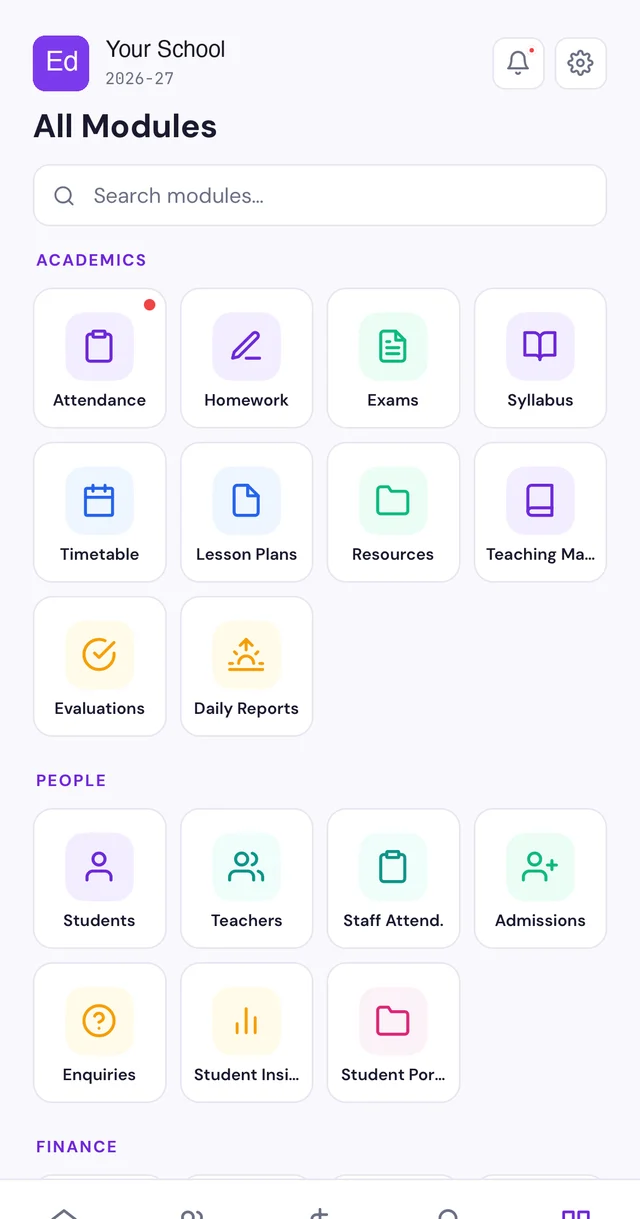
Student Management System, SIS or School ERP?
The three terms overlap enough that vendors use them interchangeably, which makes comparison harder than it needs to be. The honest distinction is scope.
Student management system
The student lifecycle — admission, attendance, fees, assessment, certificates, transfer. This is the part the school office touches every day.
Student information system (SIS)
The same scope under the term used in the United States. Indian schools rarely say SIS, but tenders and imported software often do.
School ERP
Everything above plus the institution — staff and payroll, transport, hostel, inventory and accounting. If you need those too, start at our school ERP page, and read the buying framework before shortlisting.
Which Schools This Fits
Single-campus schools
From roughly 200 students upward. Pricing is per student, and the modules a smaller school does not need stay switched off.
Multi-branch groups
Branches run independently on one student record, with group-level roll-ups for management.
Boards and mediums
CBSE, ICSE and State Boards, with the report-card and certificate formats each one requires.
Already issuing documents by hand? Our guides on the Bonafide Certificate format and the Transfer Certificate format show what the record has to hold before either can be generated reliably.
How It Compares to What You Run Today
Most schools are not choosing between two systems. They are choosing between a system and the arrangement of registers, spreadsheets and WhatsApp groups that grew by itself.
| Question | Registers & spreadsheets | Single-purpose fee software | Student management system |
|---|---|---|---|
| Student list | One per register, drifting apart | One in the fee tool, another elsewhere | One, shared by every module |
| Name correction | Corrected wherever someone remembers | Corrected twice, usually | Corrected once, everywhere |
| Certificates & TC | Typed into a Word template | Not covered | Generated from the record |
| Collection against demand | Recalculated by hand | Accurate only if the list is | Always reconciles |
| Who saw a record | Unknowable | Rarely logged | Audit trail per record |
| UDISE+ / board returns | A project each time | Partial at best | An export |
How to Evaluate One
Demos are built to go well. These are the questions that separate systems that hold up in March from systems that demo well in June — ask them with your own data on screen, not the vendor's.
- Correct a student's name. Then open fees, attendance, an old certificate and the exam sheet. How many still show the old spelling?
- Mark a student as left in August. Does the fee demand, the class list and the attendance percentage all agree afterwards?
- Issue a Transfer Certificate for a student admitted years ago. Does the date of birth match the admission record without anyone retyping it?
- Ask who can see medical or counselling notes. "Every teacher" is a DPDP problem, not a feature.
- Ask for the audit log. If there is no answer to "who opened this record", there is no answer during an incident either.
- Export everything. Can the school do it itself, today, without raising a request or paying?
- Ask what happens at renewal. Get the second-year price in writing before the first-year discount persuades anyone.
- Demo with your own staff. The clerk who will use it daily should drive, not the salesperson.
- Check the board formats. Not "supports CBSE" — the actual report card and TC your board requires, rendered.
- Ask what happens offline. Attendance and receipts should not stop when the connection does.
Moving From What You Have
The fear that keeps schools on a system they dislike is that the switch will land in the middle of a term and take the office down with it. In practice migration is mostly a data exercise, and it does not require waiting for April.
What comes across
Students with admission numbers and dates of birth, classes and sections, parent contacts, fee structures, concessions and — the part vendors gloss over — outstanding balances as they stand today. Import is from your current system's export or from Excel.
Running both for a term
The old system stays readable while the office builds confidence in the new one. Nothing is switched off on day one, and the historical record you may need for a certificate in three years is preserved rather than abandoned.
Where migrations actually go wrong
Almost never the student list. It is the money: concessions applied inconsistently, part-payments recorded against the wrong term, and siblings whose discount lives in someone's head. Reconcile outstanding balances before go-live, not after the first receipt is issued. Our mid-session switching guide covers the sequence.
What the Record Connects To
A student record earns its keep by being the thing everything else reads from. The connections that matter in an Indian school are specific.
UPI and payment gateways
Parents pay by UPI, card or netbanking, and the receipt posts against the student rather than arriving as a bank line to be matched by hand.
Fee reminders, attendance alerts and report cards reach parents where they already are, with a delivery record against the student.
Biometric and RFID devices
Attendance captured at the gate or the classroom posts to the same register the class teacher and the board inspection both read.
APAAR, ABC ID and DigiLocker
The portable academic identifier is held against the student with consent recorded — including a recorded refusal where a parent declines. See our APAAR guide.
Student Data, Ownership and DPDP
A student management system holds the most sensitive data a school will ever handle — children's personal details, parent contacts, medical information and increasingly Aadhaar-linked identifiers. Under the Digital Personal Data Protection Act the school is the data fiduciary, and "every login sees everything" has stopped being defensible.
- The school owns the data. Full export in standard formats, at any time, without raising a request.
- Role-based access. A subject teacher sees academics for their own students; accounts sees fees; medical and counselling notes are restricted separately.
- Audit trail. Who opened which record, and when.
- Consent capture for Aadhaar-linked processes, including a recorded refusal.
- Access revoked on exit. Staff logins close as part of the relieving process, not whenever someone remembers.
Our school data security guide sets out what these obligations mean in practice.
Student Management System — FAQs
What is a student management system?
A student management system is software that holds one record per student and uses it for everything the school does with that student — admission, attendance, fees, assessment, certificates, transfer and exit. Instead of a separate student list inside the fee software, the attendance register and the exam sheet, there is one list, and every module reads from it.
What is the difference between a student management system and a school ERP?
A student management system covers the student lifecycle. A school ERP covers the whole institution, adding staff, payroll, inventory, transport, hostel and accounting on top of the student record. In practice most Indian schools buy an ERP and use the student modules hardest, which is why EdPayU ships the student record as the centre of the system rather than as one module among many.
Is a student information system (SIS) the same thing?
Broadly yes. "Student information system" and "SIS" are the terms used in the United States, while Indian schools more often say student management system or school ERP. The scope people mean is the same: the authoritative record of who the student is and what has happened to them academically.
Does it generate Transfer Certificates and Bonafide Certificates?
Yes, and it generates them from the record rather than from a Word template someone fills in by hand. That is the point of holding the data once: a Transfer Certificate issued in Class 10 still agrees with the date of birth captured at admission in Class 1, because neither was retyped.
Does it work for CBSE, ICSE and State Board schools?
Yes. Report-card formats, attendance rules and certificate wording differ by board, and the system carries the format each board requires rather than a single generic one.
Can we import our existing student data?
Yes. Students, classes, fee structures and outstanding balances import from your current system or from Excel. Mid-session migration is routine and does not require waiting for the next academic year.
Who can see a student’s data?
Access is role-based. A class teacher sees their own students, the accounts desk sees fees, and medical or counselling notes are restricted separately. Under the DPDP Act a school is a data fiduciary for a large volume of children’s data, so "every login sees everything" is not a defensible position, and the system keeps an audit trail of who accessed what.
What happens to the record when a student leaves?
The record is retained, not deleted. A student who has left stops appearing in class lists, fee demands and attendance registers, while the history stays available — which is what makes it possible to reissue a certificate or answer a verification request years later.
Do parents need to install an app to see their child’s record?
No. Attendance alerts, fee reminders, report cards and notices reach parents on WhatsApp. A parent portal and mobile app exist for families who want the full record, but nothing important depends on an install.
How much does a student management system cost in India?
When comparing, ask for the total first-year cost including onboarding, data import, training and support, and ask what happens to the price at renewal. EdPayU includes onboarding and training rather than billing them separately.
Is there a free student management system?
There are free and open-source options, and they are a genuine fit for an institution with in-house technical staff who can host, secure, back up and update the system. The costs that replace the licence fee are hosting, someone to run it, and responsibility for compliance if student data leaks. For most schools the question is not whether the software is free but who is accountable at 9am when fee receipts will not print.
Can it run more than one branch on one record?
Yes. Branches operate independently — their own classes, fee structures and staff — while management sees consolidated enrolment and collection across the group. A student transferring between branches keeps one identity rather than being admitted twice.
What happens if the internet goes down?
Attendance and fee collection continue on the mobile app offline and sync when the connection returns. Receipts issued offline keep the same sequential numbering, so nothing is lost or duplicated when the two reconcile.
Does it handle UDISE+ and other statutory returns?
The data a UDISE+ return needs — class-wise and category-wise enrolment, staff details, facilities — comes out of the record rather than being collected again in a separate exercise. The return remains yours to file, but assembling it stops being an afternoon of copying between spreadsheets.
Can students and parents see their own record?
Parents receive attendance alerts, fee reminders, report cards and notices on WhatsApp, and a portal and mobile app hold the full record for those who want it. Students in senior classes can be given their own access where the school wants it. What each role can see is controlled by the school, not fixed by us.