The All-in-One School ERP Built for Indian Schools
Run fees, attendance, exams, transport, HR payroll and parent communication from one affordable school ERP. CBSE, ICSE & State Boards. WhatsApp-first.
What Is a School ERP?
A school ERP replaces disconnected registers, spreadsheets and WhatsApp groups with one connected system. A student admitted today flows automatically into fees, attendance, transport and exams — no re-typing. EdPayU is a school ERP designed for how Indian schools actually run, not a Western product bolted onto India. Comparing options? Read our buying framework and ERP vs. app guide.
What Changes in the School Office
The test of a school ERP is not its feature count. It is whether the office does less work in March than it did the March before. Three things account for most of that difference.
A student is entered once
Admission creates one record. Fees, attendance, transport, exams and certificates all read from it. When a name is corrected, it corrects everywhere — which is why a Transfer Certificate issued three years later still agrees with the birth certificate. Systems that keep a separate student list per module produce documents that quietly disagree.
Data is captured where it happens
The class teacher marks attendance in the classroom, the counter issues a receipt at the moment of payment, the subject teacher enters marks. Nothing is re-keyed later from paper, because data re-keyed later is data that has already lost its accuracy.
Reports come out without assembly
Class-wise strength, category-wise enrolment, fee collection against demand, attendance percentage, board-format report cards and the UDISE+ return are outputs of the record rather than projects. If producing them takes an afternoon of copying between spreadsheets, the system is a filing cabinet with a login.
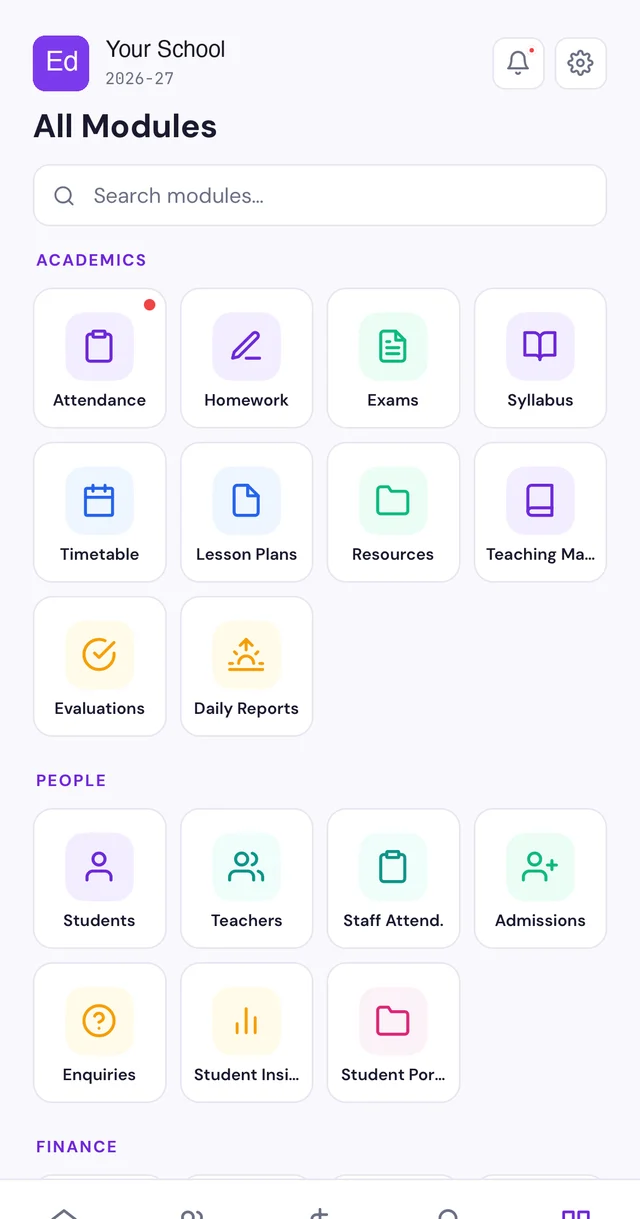
Everything Your School Runs, in One ERP
Enable what you need, add more as you grow.
Why Schools Choose the EdPayU ERP
Affordable, No Lock-In
Transparent per-student pricing, free onboarding and training, and full data export whenever you want.
WhatsApp-First
Parents get fees, attendance and notices on WhatsApp — no app to install.
Going Live, and Moving From Your Current System
Most schools evaluating an ERP are not starting from nothing. They are running a mix of registers, spreadsheets and a system somebody bought three years ago that half the staff avoid.
Day one
Students and staff import from Excel or from your existing system. Fee structures, concessions and outstanding balances come across with them. Attendance and fee links work the same morning.
Mid-session migration
You do not have to wait for April. Both systems can run in parallel for a term while the office builds confidence. Our mid-session migration playbook covers the sequence.
Training that is included
Onboarding and staff training are part of the plan, not a separate invoice. The design target is that marking attendance needs no instruction.
Adoption, not installation
Software the front office quietly abandons after two months is worse than none, because you have paid for it and still run on paper. The predictor of adoption is whether daily screens take seconds. Ask any vendor to demo with your staff, not theirs.
Data Ownership, Security and DPDP
A school holds the most sensitive data it will ever handle — student records, parent contact details, medical information, and increasingly Aadhaar-linked identifiers. Under the Digital Personal Data Protection Act the school is a data fiduciary, and “every teacher can see everything” is no longer a defensible position.
- The school owns the data. Full export in standard formats, at any time, by the school itself, without raising a request.
- Role-based access. A subject teacher sees academics for their own students. Accounts sees fees. Medical and counselling notes are restricted separately.
- Audit trail. Who accessed which record, and when.
- Consent capture for Aadhaar-linked processes such as APAAR, including a recorded refusal where a parent declines.
- Access revoked on exit. Staff logins close as part of the relieving process, not whenever someone remembers.
Our school data security guide sets out what the obligations mean in practice.
Which Schools This Fits
Single-campus schools
From roughly 200 students upward. Pricing is per student, and modules a smaller school does not need stay switched off.
Multi-branch groups
Branches run independently on one record, with group-level roll-ups for management and consolidated fee reporting.
Boards and mediums
CBSE, ICSE and State Boards, with the report-card format each one requires, and parent communication in 11 Indian languages and English.
Residential schools additionally need hostel management — room allotment, out-pass, mess and parent visibility — covered in our hostel management guide.
School ERP — FAQs
What is a school ERP?
A school ERP (Enterprise Resource Planning) is a single system that runs every part of a school — admissions, fees, attendance, exams, timetable, transport, HR and communication — instead of separate registers, spreadsheets and apps. EdPayU is a school ERP built specifically for Indian schools.
How much does a school ERP cost in India?
EdPayU is transparent and affordable with no lock-in, free onboarding and free training. See our pricing page for plans.
Is EdPayU suitable for CBSE, ICSE and State Board schools?
Yes. EdPayU supports CBSE, ICSE and all State Board grading and report-card formats, plus UPI payments, WhatsApp communication and 11 Indian languages and English.
Can we move from our existing school ERP mid-session?
Yes. Students, staff, fee structures and outstanding balances import from your current system or from Excel, and the two systems can run in parallel for a term while the office builds confidence. Mid-session migration is common and does not require waiting for April.
Who owns the data, and can we export it?
The school owns its data. Every record — students, staff, fees, attendance, marks, certificates — can be exported in standard formats at any time, by the school itself, without raising a request or paying a fee. There is no contractual lock-in.
Do parents need to install an app?
No. A parent portal and mobile app exist for those who want the full record, but nothing important depends on an install.
Does it work for a school with 200 students, or only large schools?
Both. Pricing is per student, so a 200-student school pays proportionately, and the modules that a small school does not need can stay switched off.
How does a school ERP handle DPDP compliance?
A school holds a large volume of children’s personal data and is a data fiduciary under the DPDP Act. EdPayU provides role-based access so each staff member sees only what their role requires, an audit log of who accessed what, consent capture for Aadhaar-linked processes such as APAAR, and deletion of access when staff leave.
What happens if the internet goes down?
Attendance and fee collection continue on the mobile app offline and sync when the connection returns. Receipts issued offline carry the same sequential numbering, so nothing is lost or duplicated.
Is training included?
Yes, and it is not billed separately. Onboarding and staff training are part of the plan. The design target is that a teacher who can use WhatsApp can mark attendance without being taught.